How it works
From understanding the systems to entering a score in SPRS — here's the CMMC / NIST SP 800-171 process end to end, and where this tool fits.
Understand the systems (PIEE & SPRS)
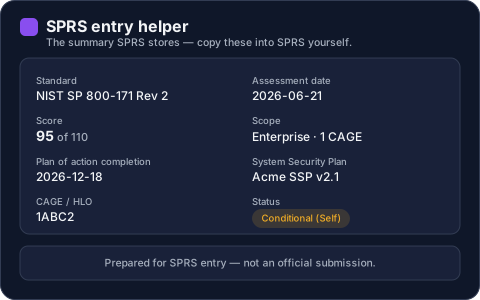
DoD cybersecurity results live in SPRS (the Supplier Performance Risk System), which you reach through PIEE (the Procurement Integrated Enterprise Environment) single sign-on at piee.eb.mil. SPRS stores your summary score, assessment date, scope, and POA&M completion date — not your individual answers. This tool prepares everything you'll enter there; it never connects to SPRS.
Determine your level and scope
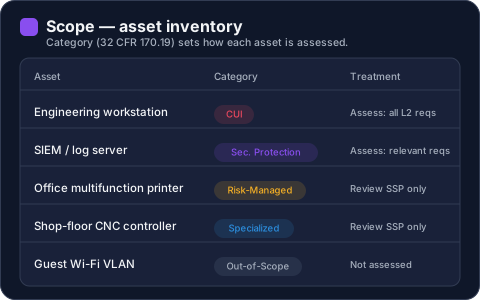
First decide which level applies: Level 1 for FCI (15 FAR 52.204-21 practices), Level 2 for CUI (the 110 NIST SP 800-171 Rev 2 requirements), or Level 3 for the highest-sensitivity programs. Then define your assessment scope — categorize assets per 32 CFR 170.19 — because scope determines which requirements apply to which systems.
Assess against the requirements
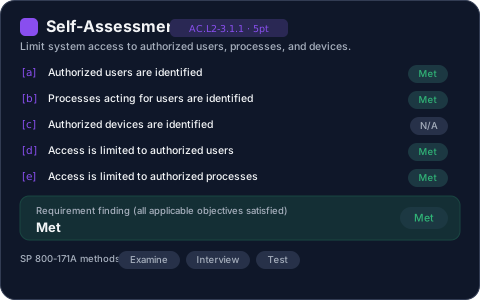
For Level 2 you work through all 110 requirements at the objective level — 319 SP 800-171A assessment objectives in total. Each requirement resolves to Met, Not Met, or N/A; N/A is scored the same as Met. A System Security Plan (3.12.4) is a prerequisite, not a deduction.
See your score and status
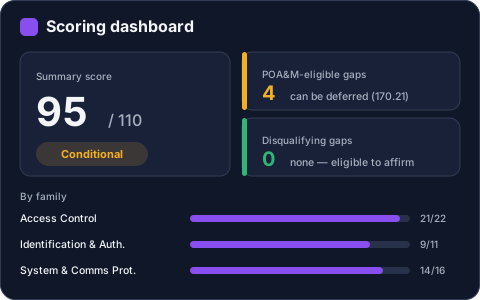
Scoring starts at a baseline of 110; each unimplemented requirement subtracts its weighted value (5, 3, or 1), so the score can go negative. A score of 110 is a Final self-assessment; 88–109 is Conditional (with a POA&M); below 88 you can't affirm a Conditional or Final status.
Close POA&M items in time
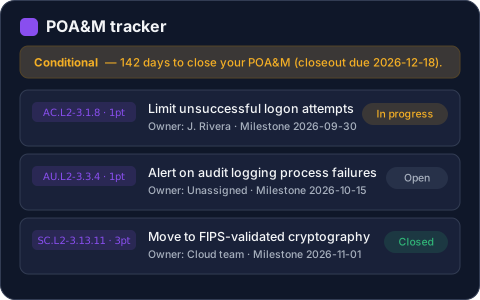
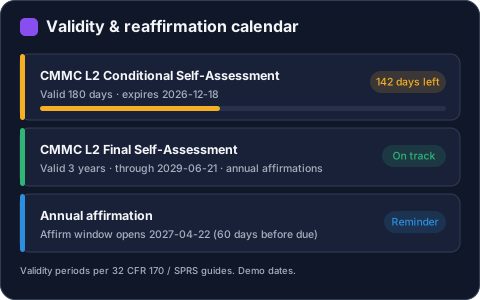
A Conditional Level 2 self-assessment is valid 180 days — you close the eligible gaps via a closeout assessment within that window to reach Final. Not every gap is POA&M-eligible: high-weight requirements and six specific requirements can't be deferred (32 CFR 170.21).
Affirm and enter in SPRS
Every assessment is affirmed by an Affirming Official with the SPRS Cyber Vendor User role in PIEE. A Final Level 2 self-assessment is valid 3 years with annual affirmations. You enter the summary score, date, and scope into SPRS yourself — this tool gives you a clean, SPRS-ready summary to work from.
See where you stand today.
Start a free self-assessment